All-in-One Recruitment Platform for Your Organisation
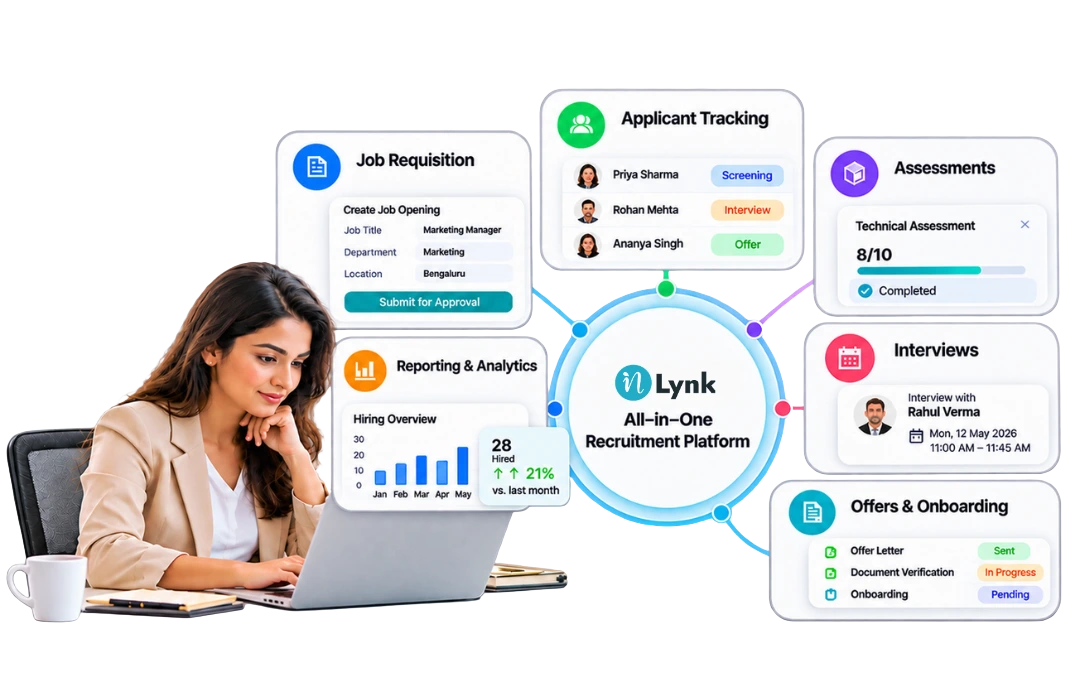
Choose an all-in-one recruitment platform that combines applicant tracking, job approvals, candidate assessments, interview scheduling, and offer management in one connected system. Prioritise ease of use, data security, integrations, and scalability to support your organisation’s hiring needs.
Hiring involves several people, systems, and decisions. Recruiters manage applications, hiring managers review candidates, interviewers provide feedback, and HR teams handle offers and documentation. When these activities happen across disconnected tools, information can get lost, approvals can take longer, and candidates may not receive timely updates.
An integrated recruitment platform can bring these activities into a more connected workflow. However, choosing the right solution requires more than comparing feature lists or selecting the software with the most automation.
This guide explains what to look for, how to compare recruitment platforms, which questions to ask vendors, and how to choose a solution that meets your organisation’s needs.
Table of Contents
- What Is an All-in-One Recruitment Platform?
- Why Do Organisations Need an Integrated Recruitment Platform?
- Key Features to Look for in an Recruitment Software
- How to Choose the Right Recruitment Platform
- All-in-One Recruitment Platform vs. Separate Hiring Tools
- Common Mistakes to Avoid
- How inLynk Supports the Recruitment Process
- Frequently Asked Questions
What Is an All-in-One Recruitment Platform?
Integrated recruitment software combines multiple hiring activities in one system. Depending on the product, it may include job requisition management, applicant tracking, resume screening, candidate assessments, interview scheduling, offer management, and recruitment reporting.
The main purpose is to reduce the need to switch between separate tools for everyday hiring tasks. Recruiters can manage applications, hiring managers can review candidates, and interviewers can submit feedback through a more connected process.
For example, a company hiring 20 employees across three departments may need several recruiters, multiple interview rounds, and approvals from different managers. An integrated recruitment platform can help the team manage these activities while keeping candidate records and hiring progress accessible to authorised users.
However, all-in-one does not mean every feature is automatically included or enabled. Before choosing a platform, confirm which features are available, which require additional configuration, and which involve extra costs.
Why Do Organisations Need an Integrated Recruitment Platform?
Recruitment often becomes complicated when a company uses separate tools for applications, interviews, assessments, and offers. Information may be entered more than once, and recruiters may need to follow up manually to find out what is happening.
Industry research highlights the importance of reviewing these processes. SHRM’s 2025 recruiting benchmark reported a median time to fill of approximately 44 days for non-executive positions and 45 days for executive positions. These figures are US benchmarks, not universal targets, but they show that hiring can involve several weeks of coordination and decision-making.
An integrated recruitment platform can help organisations address common challenges:
- Scattered candidate information: Keep applications, resumes, and interview feedback linked to the relevant candidate and vacancy.
- Slow approval processes: Route job openings and offers through defined approval steps.
- Scheduling difficulties: Coordinate interview slots, interviewer availability, and candidate confirmations.
- Unclear hiring progress: Give authorised team members a shared view of recruitment stages and pending tasks.
- Limited reporting: Track recruitment activity and identify stages where applications are delayed.
Technology alone will not solve every hiring problem. Clear responsibilities, realistic job requirements, and timely decisions remain important. The platform should support these practices rather than replace them.
Key Features to Look for in an Recruitment Software
The right feature set depends on your organisation’s size, hiring volume, and recruitment process. Use the following checklist when comparing best recruitment software options.
Applicant tracking and candidate management
Look for an applicant tracking system that allows recruiters to store candidate profiles, review resumes, search applications, and move candidates through recruitment stages.
Check whether the platform maintains a clear history of status changes and prevents important information from being lost when several recruiters work on the same vacancy.
Job requisitions and approval workflows
The platform should support the way your organisation approves new positions. Check whether you can assign hiring managers, define approval steps, record decisions, and control who can publish vacancies.
This is particularly important for businesses with multiple departments or formal headcount approval procedures.
Resume screening and assessments
Some platforms offer resume parsing, candidate-to-job scoring, online tests, and assessment reports. These tools can help recruiters organise initial reviews and evaluate job-related skills.
Ask vendors how automated scoring works, what information it uses, and how recruiters can review or challenge its recommendations. Candidate selection should remain fair, relevant to the job, and subject to appropriate human oversight.
Interview scheduling and feedback
An effective platform should make it easier to coordinate interview rounds, manage availability, send confirmations, and collect feedback.
If your organisation interviews candidates across different locations, check timezone handling and calendar integrations. Test the scheduling process rather than relying only on a product demonstration.
Offer management and document verification
Check whether the system supports offer approvals, offer-letter generation, electronic signatures, candidate acceptance, and document collection.
These capabilities are particularly useful when several people must approve an offer or when the organisation needs a clear record of outstanding pre-joining tasks.
Reporting and recruitment analytics
Look for reports that help you answer practical questions:
- How many candidates are at each recruitment stage?
- How long do approvals and interviews take?
- Where are candidates dropping out?
- How many offers are accepted?
- Which recruitment sources produce suitable applicants?
Choose a platform that provides meaningful reports rather than dashboards filled with metrics your team will not use.
Security, integrations, and scalability
Candidate records contain personal information, so security deserves careful attention. Review role-based permissions, audit logs, secure document storage, and the vendor’s data-handling practices.
Also check whether the software connects with your careers website, job boards, email services, and calendar tools. Finally, consider whether it can accommodate more recruiters, departments, and vacancies as your organisation grows.
Simplify Your Hiring Process. Explore how inLynk connects recruiter workflows and candidate activities in one recruitment ecosystem. Explore inLynk Recruit
How to Choose the Right Recruitment Platform
Use these seven steps to compare recruitment platforms based on your actual hiring needs.
Step 1: Map your current hiring process.List each stage, from requesting a new position to accepting an offer. Identify where delays, repeated data entry, or missed updates occur.
Step 2: Separate essential features from optional ones.Create two lists. Your essential requirements might include candidate tracking, approvals, and interview scheduling. Advanced assessments or AI screening may be optional, depending on your needs.
Step 3: Compare platforms against the same criteria.Use a consistent scoring sheet instead of relying on sales presentations.
| Evaluation criterion | What to check |
|---|---|
| Core functionality | Does it cover your required hiring stages? |
| Ease of use | Can recruiters and managers complete common tasks easily? |
| Automation | Which tasks are automated, and which require manual action? |
| Integration | Does it connect with your existing systems? |
| Security | Are permissions, audit records, and file protection available? |
| Reporting | Can you track the recruitment metrics that matter? |
| Total cost | Are implementation, additional features, and support included? |
| Scalability | Can it accommodate future hiring requirements? |
Step 4: Test a realistic hiring scenario.Create a sample vacancy, review an application, schedule an interview, record feedback, and prepare an offer. This will show whether the software supports your team’s actual workflow.
Step 5: Check the candidate experience.Make sure the application process works on mobile devices, instructions are clear, and candidates can understand what happens next. The CIPD recommends evaluating recruitment technology for fairness, accessibility, and candidate experience before adopting it.
Step 6: Review security and vendor support.Ask how candidate data is stored, who can access it, how long records are retained, and what support is available during implementation.
Step 7: Calculate the overall value.Compare the total cost with the administrative work the platform could help reduce. Consider staff time, implementation effort, and ongoing maintenance rather than looking at the subscription price alone.
All-in-One Recruitment Platform vs. Separate Hiring Tools
An all-in-one platform is not automatically the best option for every organisation. The decision depends on how many tools you currently use and how well they work together.
| Factor | All-in-One Recruitment Platform | Separate Hiring Tools |
|---|---|---|
| Data management | Can maintain connected recruitment records | Information may be spread across systems. |
| Workflow | Can connect multiple hiring stages | Workflows may require manual handovers |
| Implementation | May require a broader initial setup | Individual tools may be easier to introduce separately |
| Integrations | Some connections may be built in | Integration work may be needed between tools |
| Flexibility | Depends on the platform’s available features | Organisations can select specialist tools |
| Cost | May combine several functions in one subscription | Costs vary across individual subscriptions. |
| Best suited for | Teams seeking connected hiring workflows | Teams with specialised needs or effective existing systems |
Before switching, check whether your existing tools already provide the required functionality. A platform that replaces several disconnected systems may simplify work, but a poorly matched all-in-one solution can introduce unnecessary complexity.
6.Common Mistakes to Avoid
When comparing hiring software solutions, watch out for these common mistakes:
- Choosing based on feature count: More features do not necessarily mean a better fit.
- Ignoring the candidate journey: A system should work for applicants as well as recruiters.
- Overlooking hidden costs: Ask about implementation, training, integrations, and additional modules.
- Assuming AI makes every decision better: Automated recommendations need suitable data, testing, and human review.
- Skipping practical testing: Test real workflows before committing to a platform.
- Ignoring future requirements: Consider expected changes in hiring volume, departments, and recruitment processes.
A careful evaluation helps your organisation select software that solves real problems instead of adding another system for employees to manage.
How inLynk Supports the Recruitment Process
inLynk offers two connected applications: inLynk Recruit and inLynk Candidate. Together, they support the internal recruitment team and the applicant’s journey.
inLynk Recruit
The recruiter-facing application includes capabilities for:
- Job openings, requisitions, and approval workflows.
- Candidate profiles, resume management, and application tracking.
- Optional AI resume parsing and AI-assisted screening.
- Question banks, assessments, scoring, and results.
- Interview scheduling and feedback.
- Offer approvals, electronic signatures, and document verification.
- Recruitment reporting, permissions, and audit history.
inLynk Candidate
The candidate-facing portal allows applicants to browse vacancies, submit applications, track progress, complete assessments, select interview slots, review offers, and upload requested documents.
Both applications use a shared data model, so recruiter actions and candidate activities are reflected in the same recruitment records. Optional features and integrations may require configuration before use.
For organisations comparing recruitment management solutions, inLynk provides a combination of recruiter workflows and candidate-facing functionality worth evaluating against their specific requirements.
Ready to Improve Your Hiring Workflow? Discover how inLynk Recruit and inLynk Candidate support a more connected recruitment process. Discover inLynk
Conclusion
Choosing the right recruitment platform starts with understanding how your organisation hires. The most suitable solution should support your essential workflows, provide a good candidate experience, protect personal information, and fit your budget.
Compare platforms using the same criteria, test real recruitment scenarios, and confirm which features are included before making a decision. An all-in-one system can be useful when it connects activities that would otherwise require several separate tools.
For organisations seeking connected recruiter and candidate workflows, inLynk Recruit and inLynk Candidateoffer capabilities covering multiple stages of recruitment. Evaluate those capabilities against your requirements to determine whether inLynk is the right fit for your team.
Frequently Asked Questions
What is an all-in-one recruitment platform?
This type of recruitment software combines multiple hiring activities, such as job approvals, applicant tracking, assessments, interviews, and offer management. Available features vary by provider.
How do you choose the best recruitment software for your organisation?
Start by identifying your recruitment challenges and essential features. Compare usability, workflow automation, integrations, security, reporting, scalability, and total cost. Test shortlisted platforms using a realistic hiring scenario before making a decision.
Why should businesses consider integrated recruitment software?
Integrated recruitment software can reduce repeated data entry, keep candidate records organised, and connect activities across the hiring process. Its value depends on how well it fits the organisation’s workflow.
Is cloud-based recruitment software suitable for growing businesses?
Cloud-based recruitment software can help growing businesses manage recruitment without maintaining their own software infrastructure. Before choosing a provider, check its security controls, pricing, integrations, support, and ability to accommodate future hiring needs.
What is the difference between recruitment management software and applicant tracking system software?
Applicant tracking system software primarily manages applications and candidate progress. Recruitment management software may cover a broader range of activities, including job approvals, assessments, interviews, offers, and reporting. Modern products often overlap in functionality.
How can an organisation measure recruitment software performance?
Track measures such as time to fill, cost per hire, application-to-interview conversion, offer acceptance rate, and candidate experience. Compare results against your own baseline and review them consistently rather than relying on a single metric.
Leave a Reply