
A digital workspace is an online area where work happens. It centralizes communication for faculty, students, and administration into one secure platform. It eliminates scattered emails, integrates work tools, and provides instant access to campus resources so everyone stays connected in real time.
Table of Contents
- Making Campus Communication More Effective
- Why Traditional Campus Systems Fall Short
- Core Benefits for the Educational Community
- Key Features of a Connected Campus
- Steps to Implement Your New Platform
- Frequently Asked Questions (FAQ)
Making Campus Communication More Effective
Educational institutions often struggle with a messy communication process. Faculty members use specific learning systems for their classes. Students rely on informal group chats or social media to talk about projects. Meanwhile, the administration sends critical updates through mass emails that often go unread or end up in spam folders. This creates a disconnected environment where important details slip through the cracks.
According to industry standards in 2024, universities lose hundreds of hours annually to mismanaged communication and disconnected software tools. Research indicates that adopting a unified platform reduces administrative email volume by 42% and increases student response rates by 35%.
A digital workspace platform solves this problem. It is built specifically for organizations to connect their people. Instead of using different programs for different tasks, everything takes place in one single location. When a school unifies essential tools in one powerful platform, it enables seamless collaboration, communication, and productivity across all departments.
Need help implementing this strategy? Book a personalized demo of our education platform.
Why Traditional Campus Systems Fall Short
Before digital workspaces became common, schools relied on legacy systems. These older setups force users to log into many different portals. A student might check one website for their grades, a different website for course materials, and a third website to talk to the financial aid office.
This setup frustrates users. It also costs the school a lot of money in extra software licenses. Legacy systems often lack proper mobile support. They do not work well on modern phones or tablets. Businesses and schools use a unified platform so they do not have to use multiple separate applications.
Here is a breakdown of why schools are moving away from traditional methods and choosing connected digital ecosystems:
| Feature | Legacy Campus Systems | inLynk Digital Workspaces for education |
|---|---|---|
| Tool Count | High (Email, SMS, Portals) | Low (All-in-one platform) |
| Accessibility | Desktop only, requires downloads | Easy web & app access |
| Virtual Learning | Separate, easily lost links | Integrated video collaboration software |
| Updates | Slow, manual, often missed | Instant, tracked, visible to all |
| Project Work | Scattered files across drives | Centralized project coordination |
By moving away from old legacy systems, schools can build a secure, connected environment that actually works for the people who use it every day.
Core Benefits for the Educational Community
Implementing Digital Workspaces for educations streamlines daily tasks and clears up communication channels across the board. The platform provides a user-friendly interface designed to simplify interactions. Here is how a central platform supports the three main groups on any campus:
How Faculty Manage Classes
Teachers and professors deal with a heavy workload. They need to teach, grade papers, and talk to students. When they use too many software tools, they waste time that they could spend helping students learn.
A digital workspace combines many different work tools together, including tools for managing work assignments. Faculty can upload a syllabus, assign homework, and collect essays all in the same place. When they teach classes online, they can use built-in video collaboration software. During these live sessions, teachers can manage participants easily without struggling to understand complex controls. They can mute microphones, share screens, and answer questions from a single dashboard.
How Students Stay Connected
Students need fast, clear information to succeed. When a professor changes a due date or moves a class to a different room, students need to know right away. Traditional emails often arrive too late.
A digital workspace gives students instant updates regarding deadlines and campus events. Because modern platforms offer full web & app access, students can check their schedules, read announcements, and work on group projects from any device. They do not face software barriers or download limits. They simply log in and get to work. This simple access removes the friction of finding information, so students have more time to focus on learning.
How Administration Keeps Control
School leaders, deans, and campus staff manage the big picture. They need to make sure the campus runs smoothly and safely. When an emergency happens, or when a major policy changes, the administration needs a secure method to reach everyone instantly.
A unified platform allows the administration to broadcast alerts to the entire campus, bypassing cluttered email inboxes. It also gives the staff capabilities for task management, project coordination, and knowledge sharing. From processing student applications to organizing campus events, the administration can track every step in one place.
Want to see this in action? Read our guide on closing communication gaps with an internal newsfeed.
Key Features of a Connected Campus
To truly improve communication, a digital workspace must offer the right features. It must function as an all-in-one digital ecosystem that supports every aspect of organizational needs.
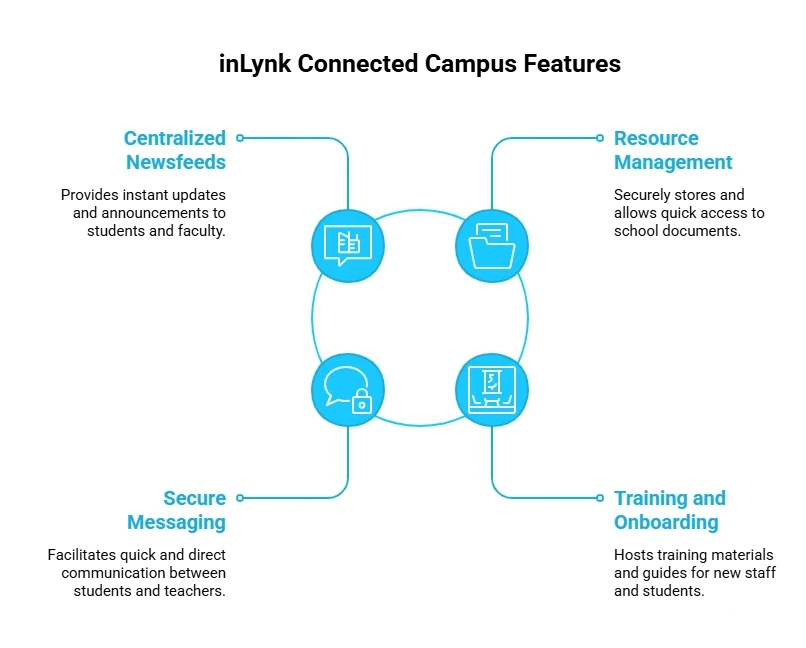
- Centralized Newsfeeds: Just like a social media feed, a campus newsfeed displays the most important updates at the top of the screen. Students and faculty see announcements the moment they log in.
- Resource Management: Schools have thousands of documents, from student handbooks to medical forms. A digital workspace stores these files securely. Users can search for a document and find it in seconds.
- Secure Messaging: Sometimes a student needs to ask a quick question without sending a formal email. Integrated chat tools allow quick, direct messages between students and teachers.
- Training and Onboarding: When new staff members join the school, or when freshmen arrive on campus, they need to learn how things work. The platform can host training materials and step-by-step guides to help new users learn fast.
These features work together to create a smooth, connected experience for everyone involved.
Steps to Implement Your New Platform
Transitioning a campus to a new system requires a clear, simple plan. You cannot simply turn off the old systems and expect everyone to know how to use the new one.
Start by identifying the main bottlenecks in your current communication setup. Ask your staff and students what frustrates them the most. Once you understand the problems, you can configure your new digital workspace to solve those specific issues.
Roll out the platform in stages. Start by moving the administration announcements first. Show the staff how easy it is to post updates. Next, migrate faculty course management tools. Give teachers time to set up their virtual classrooms. Finally, introduce the platform to the student body. Provide simple, easy-to-read instructions.
Skip the manual work. Learn how to implement a digital workspace for a hybrid team.
Frequently Asked Questions
What is a digital workspace for education?
A digital workspace is a centralized online area where daily academic work happens. It connects students, teachers, and staff in one single location. It provides tools for document sharing, instant messaging, and managing assignments so schools do not have to use multiple separate applications.
How does a digital workspace help teachers?
It saves them time. Teachers can use the platform to share files, grade work, and host live online classes using video collaboration software. They can also manage participants easily during these live sessions without learning complicated tech skills.
Why do digital workspaces improve student success?
They remove the friction of finding information. When students spend less time hunting for links, tracking down assignment details, or navigating disconnected portals, they have more time to focus on their actual studies. With total web & app access, they stay connected from anywhere.
How do we start using a digital workspace on our campus?
Start small. Identify the biggest communication problems you face today. Set up the platform to solve those specific problems first. Train your administration and faculty before you invite the students. Roll the system out in clear, simple phases to ensure everyone feels comfortable using it.
Leave a Reply